Download our free SNMP White Paper. Featuring SNMP Expert Marshall DenHartog.
This guidebook has been created to give you the information you need to successfully implement SNMP-based alarm monitoring in your network.
1-800-693-0351
Have a specific question? Ask our team of expert engineers and get a specific answer!
Sign up for the next DPS Factory Training!

Whether you're new to our equipment or you've used it for years, DPS factory training is the best way to get more from your monitoring.
Reserve Your Seat TodayIf you're a professional who manages a significant telecom/corporate network, you'll likely need to use the Simple Network Managment Protocol (SNMP protocol). This basic FAQ list will get you started. If your interest is merely to learn about this protocol in a general sense, please remember that the answers below were written with the enterprise systems in mind.
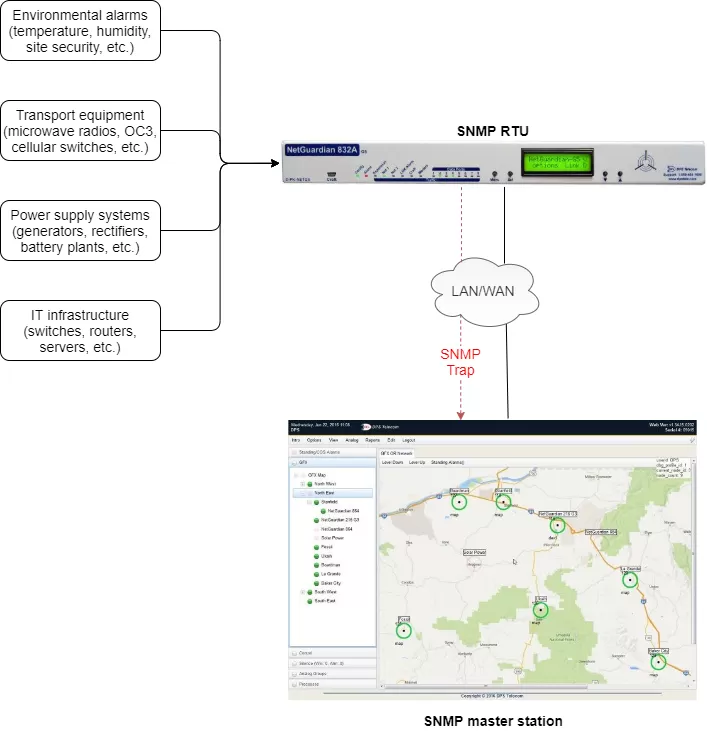
An trap(SNMP message) is a warning event sent by a managed device over a network when a change-of-state (COS) event occurs. Some events that will trigger a device to send traps include power outages and security breaches. However, devices will also send traps for simple status events, such as doors opening and closing. These traps are sent across the network in the same manner, and are given no priority when using a standard alarm master - also called manager.
Trap requests can fall under two groups, polled or autonomous.
When an SNMP manager operates using polled traps, it will regularly request updates from all managed devices. This is accomplished according to a single time frame, such as every half hour, or every five minutes.
When traps are autonomous, they are automatically sent to the manager any time a COS event occurs. Rather than updating the manager on the status of a door every few minutes, autonomous traps are sent every time a door opens or closes.
Traps sent from devices usually conform to 1 of 2 major trap systems: granular or variable bindings.
When a trap message is assembled in the granular format, each single trap is specified a trap identifier rather than a Variable Binding Style (VBS). This identifier is a number that is accepted by the SNMP manager to indicate a particular state change, such as a single door opening. The messages are set apart by providing a different detail message for each trap, such as indicating a door is open, or a battery charge is low.
Granular traps each have a unique OID so that you can tell them apart from one another. The manager getting the traps from the device will look up the OID in a translation file called a management information base or MIB. Because granular traps use unique numbers to support this lookup method, no actual alarm data needs to be contained within the SNMP trap. This reduces bandwidth consumed by traps, because they are not sending redundant information through the network.
It is often the case that SNMP problems are caused by the content of traps being sent. Therefore, it is important to check for these SNMP trap issues.
The SNMP protocolhas three major versions: SNMPv1, SNMPv2c and SNMPv3.
SNMPv1 was the first version of SNMP. Although it accomplished its goal of being an open, standard protocol, it was found to be lacking in key areas for certain applications. Later versions have addressed many of these problems. Smaller RTUs commonly support SNMPv1.
SNMPv2c is a sub-version of SNMPv2. Its key advantage over previous versions is the Inform command. Unlike Traps, which are simply received by a manager, Informs are positively acknowledged with a response message. If a manager does not reply to an Inform, the SNMP agent will resend the Inform.
SNMPv3 is the newest version of SNMP. Its primary feature is enhanced security.
The "EngineID" Identifier in SNMPv3 uniquely identifies each SNMP entity. Conflicts can occur if two SNMP entities have duplicate EngineID's. The EngineID is used to generate the key for approved messages.
SNMPv3 security comes primarily in 2 forms:
Authentication
Authentication is used to ensure that traps are read by only the intended recipient. As messages are created, they are given a special key that is based on the EngineID of the entity. The key is shared with the intended recipient and used to receive the message.
Privacy
Privacy encrypts the payload of the SNMP message to ensure that it cannot be read by unauthorized users. Any intercepted traps will be filled with garbled characters and will be unreadable. Privacy is especially useful in applications where SNMP messages must be routed over the Internet.
If your manager is configured to accept v1 traps and your device is sending v2 traps, you will encounter problems.
Likewise, some managers that are configured to receive v2 traps will not accurately parse v1 traps. Configure your RTU to send the SNMP version of traps that your manager is setup to accept, or configure your manager to accept the type of traps that your remote gear is sending. In essence, most v2 managers can be configured to receive v1 traps. Each version has different pros and cons, and you need to think about conformity.
It can also be problematic if a device is sending non-standard traps. Even though SNMP is a standard protocol, some people have modified formats of their traps to suite special needs.
SNMP is primarily used when sending trap communications through a network to the device manager. In some situations, SNMP relieves network administrators of the job of requesting information from every device along a network individually. Instead, managed devices send unrequested alert in the form of autonomous traps to one common SNMP network monitoring application.
Trap messages are the main form of communication between an SNMP Agent and a manager. A benefit of using Traps for reporting alarms is that they trigger immediately, rather than waiting for a status request from the manager.
Once you receive the trap, you can take action based upon the event described by the SNMP trap. However, you cannot send a trap message back to a device, as SNMP trap communication only occurs from device to network manager. The management application must inform the appropriate person of the event.
Look for these key features:
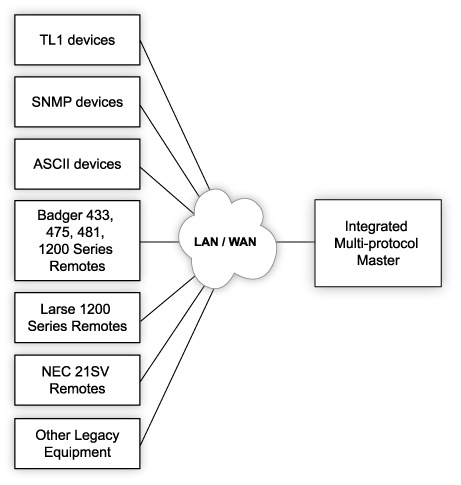
Solely relying on an SNMP manager for your key network monitoring does not take into account the vast amount of legacy and non-SNMP equipment that is working perfectly fine in networks around the world. The role of a manager is best used for performing an inventory of network devices and drilling down into gear details after your network monitoring system notifies you of an issue.
SNMP is only one item in your network alarm monitoring toolkit, and it can be used more effectively when it is part of your total network monitoring solution.
What are some common mistakes typically made when integrating SNMP and non-SNMP monitoring?The manager sends a Get or GetNext message to read a variable and the agent's response contains the requested information if managed. The manager then sends a Set to change a variable and the agent's response confirms the change if allowed. The SNMP agent sends a Trap when a specific event occurs.