
Check out our White Paper Series!
A complete library of helpful advice and survival guides for every aspect of system monitoring and control.
1-800-693-0351
Have a specific question? Ask our team of expert engineers and get a specific answer!
Sign up for the next DPS Factory Training!

Whether you're new to our equipment or you've used it for years, DPS factory training is the best way to get more from your monitoring.
Reserve Your Seat Today 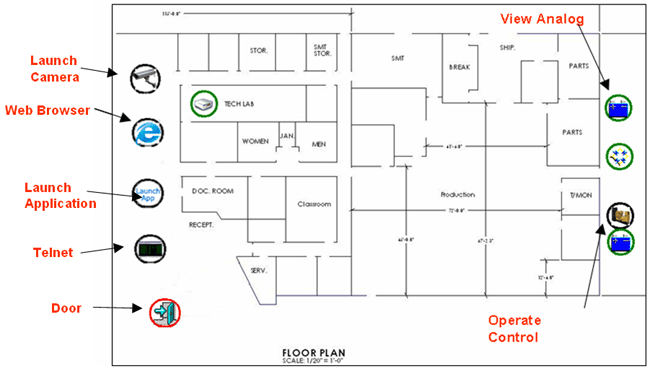
You can handle many different monitoring tasks, all from icons displayed on your own custom floorplans.
There's no doubt that zoomable maps in T/GFX software make your job easier. Let's face it: Your network visibility gets a whole lot better when you can see alarms on geographic maps. With that said, customizable floor plans take your monitoring to the next level.
Intuitive floor plans, which are fully supported by the T/Mon GFX monitoring platform, make site management a snap. By clicking icons on a customized T/GFX floor plan, you can handle many different monitoring tasks from one place. You'll simply upload a standard image file for the floor plans you want to use, then place icons in the appropriate place to create a bird's eye view of your telecom site, server room/closet, or other important building.
From a T/GFX floor plan view, you can:
Floor plans can reduce the chance of human error
Having access to everything in one place can dramatically reduce the chance of human error. When your operators only have to look at one monitoring screen - and that screen is an intuitive floor plan they can instantly understand - the chance of missing an alarm or performing the wrong action goes way down.
To see all of T/Mon's monitoring screen options, including customizable floor plans, visit the T/Mon screens page.
To receive a price quote or ROI analysis...
Call 1-800-693-0351
More information in this Equipment Monitoring Tutorial...


