
Download our free Monitoring Fundamentals Tutorial.
An introduction to Monitoring Fundamentals strictly from the perspective of telecom network alarm management.
1-800-693-0351
Have a specific question? Ask our team of expert engineers and get a specific answer!
Sign up for the next DPS Factory Training!

Whether you're new to our equipment or you've used it for years, DPS factory training is the best way to get more from your monitoring.
Reserve Your Seat Today
Your SiteMON IP cameras already provide supplemental alarms and controls and capture images on a trigger to help prevent theft at your sites, so why not make them a total surveillance solution?
DPS View can help you do just that. With this Windows-based software, you won't have to juggle between your cameras' web browsers or dial directly into your sites with T/Mon GFX.
Rather than viewing your cameras individually, either through T/MonGFX or the SiteMON web interface, DPS View allows you to organize the feeds from all of your SiteMON cameras to turn your standard workstations into full-on surveillance systems.
With DPS View, you can arrange your feeds to display in groups of up to 16 at any given time. You can switch between groups of feeds by clicking on tabs at the top of the screen. You can arrange your camera feeds accross pages in a scheme that makes sense for you and your sites, so you can get just the view you're looking for.
Setting-up DPS View is simple. You simply import your cameras, either by inputting their IP addresses or using the auto-import function to search your subnet for available cameras. Then you arrange the cameras to display in an order that suits you, and voila: you're ready to be the night watchman.
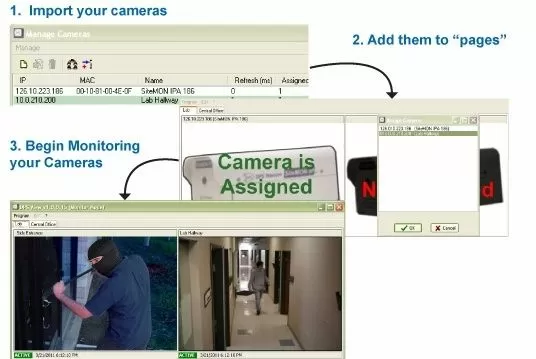
There's no worry of an errant keystroke or a novice user upsetting your equipment, network, or feeds either. The program works independantly of your network monitoring systems, and the program's editing mode is password locked. When opened, DPS View defaults to the program's monitoring mode, so all you have to do to monitor your sites is start the program.
Save yourself the extra cabling, hassle, and money of installing an antiquated CCTV system to see what's going on at your sites and simply use your SiteMON cameras and standard workstations with DPS View.


