A high-quality building access system will enhance the security of your sites.
This guide to will show you how to ensure the safety of your revenue-generating equipment.
1-800-693-0351
Have a specific question? Ask our team of expert engineers and get a specific answer!
Sign up for the next DPS Factory Training!

Whether you're new to our equipment or you've used it for years, DPS factory training is the best way to get more from your monitoring.
Reserve Your Seat Todayby Mac Smith
If you manage multiple remote locations, you know how difficult it can be to work with old-fashioned metal keys. Who has keys to which sites? What happens when someone loses a key? How do I grant temporary access to third-party contractors so I don't have to "babysit" them?
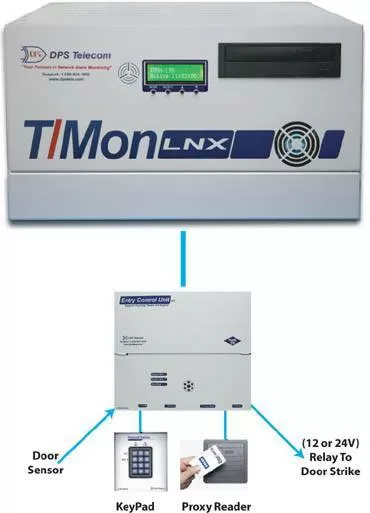
It doesn't matter whether you work for a telco, a utility, a government agency, or any other kind of organization - you've got to manage your doors more effectively. The RTU-based DPS Building Access System works well at sites where you also have network equipment to monitor, but what about other locations? At some kinds of sites (warehouses, office buildings, storage yards, etc.), you might only need to control door access.
Fortunately, the LAN Entry Control Unit (ECU) handles does precisely that job. You get easy configuration, easy management, and telco-grade reliability at sites that need door control but don't need extensive network monitoring.
The Building Access System (BAS) is a comprehensive building entry management system that adds centralized door access control to the T/Mon master station and NetGuardian RTUs. With the system in place, you can electronically control and log all site access by person, location, and time of day. It allows you to efficiently deploy electronic access control at any site that has LAN connectivity.
The Building Access System used to require an RTU to report to T/Mon and locally process entry requests made through an entry control unit (ECU). The ECU LAN, however, grants or denies access on its own, performing both the RTU and ECU functions of the traditional Building Access System. It communicates directly with T/Mon to retrieve and report access data, stores its own access data locally, and issues control logic for a single door.
With the ECU LAN, you can cost-effectively and easily add individual doors to your building access system to control doors at small sites where you don't have or need an RTU. This allows you to extend building access functionality to sites that would've otherwise been unmonitored or controlled by a completely separate system.
And if you have just a handful of doors you wish to control, and no telecom equipment to monitor, then you can run the ECU LAN as a completely independent building access system. All databasing and monitoring is handled within the web interface of the ECU LAN. Just type the unit's IP address into your web browser and login with your username and password to administer your own single-door access system.
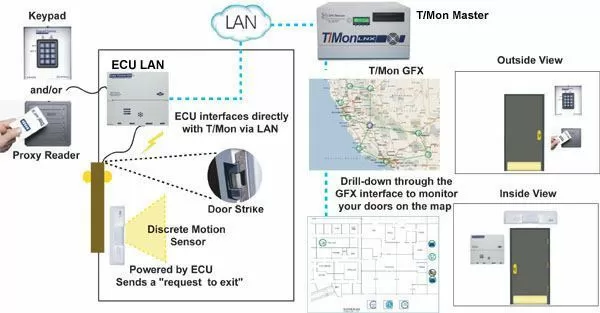
The ECU LAN:
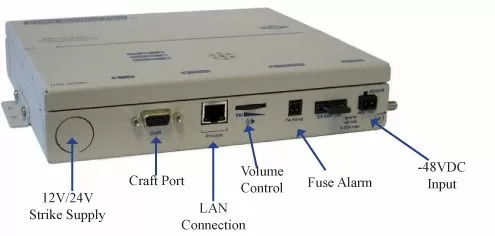
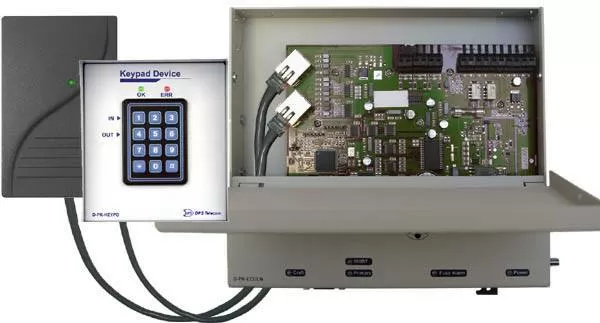
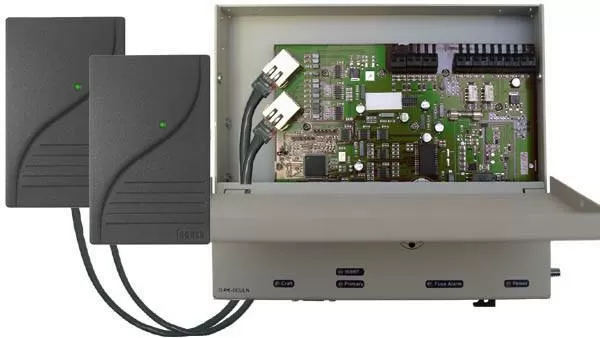
The release of this new ECU LAN door controller means that, no matter what your industry and your number of key card entry doors, the Building Access System has a cost-effective configuration for you...
| Equipment You Have | Your Ideal BAS Solution |
| One door and no telecom equipment | ECU LAN, managed via web interface |
| Many doors at many sites | One ECU LAN per door, managed via T/Mon BAS (door-only master station), also see BAC 32 below |
| Doors and telecom equipment | T/Mon LNX or T/Mon SLIM, plus any RTUs/ECUs as needed per site |
| A site with telecom equipment and 1-8 doors | NetGuardian 832A/216F/420 with 1 RS485 port & 1-8 ECUs |
| A site with telecom equipment and 9-16 doors | NetGuardian 832A/216F/420 with 2 RS485 ports & 9-16 ECUs |
| A site with 17-32 doors | Building Access Controller (BAC) 32 |
To receive a price quote or ROI analysis...